
Notepad++ is a very useful text editor for every programmer, sadly its not yet available on the Mac OSX,
If you are in a situation where you want to put some text at the start of each line in your text, or at the end of each line , or both , well you can achieve this in notepad++ using the Find and Replace option using Regular Expression.
Check out how you can do it,
Step 1: Open Your text in Notepad++
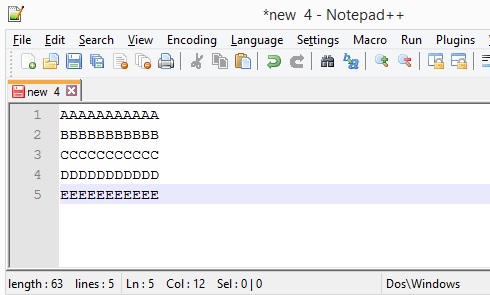
Step 2: To add Text at the Start of each line
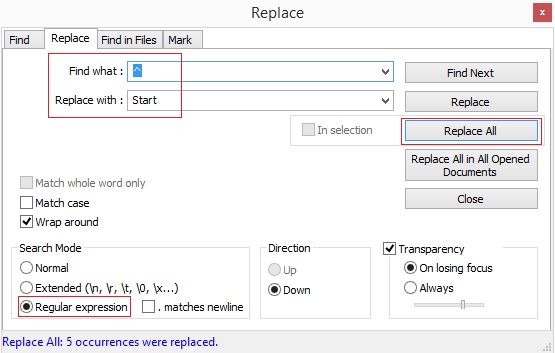
Press Ctrl+F to open Find window, click on the Replace tab, check that you have selected Regular Expression option, now add ^ in the Find textbox and the text you want at the start of each line in the Replace textbox, and click Replace all.
Step 3: To add Text at the End of each line
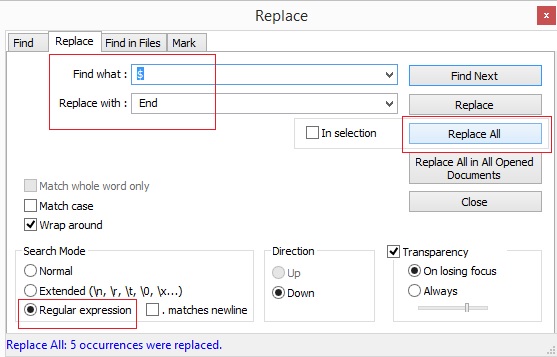
Press Ctrl+F to open Find window, click on the Replace tab, check that you have selected Regular Expression option, now add $ in the Find textbox and the text you want at the End of each line in the Replace textbox, and click Replace all.
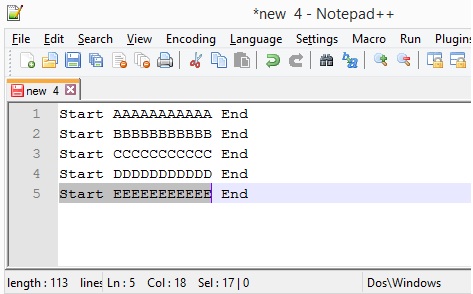
Step 4: Result: You should now be able to see the changes.
Important: Do not forget to enable "Regular Expression" radio box, if you do not do so, you would not get the results!

No comments:
Post a Comment